
How to plan before vibe coding:
the hour that saves the afternoon.
The agent builds the first prompt fast and the tenth correction slowly. Here is what to settle before the first prompt, in six steps, and what the first prompt should be.

· Six minutes
The first prompt is fast.
The corrections are the job.
Vibe coding fails in the second hour, never the first. The first prompt comes back as a working page in minutes, and it is exciting. Then you notice the button says the wrong thing, ask for a change, and the agent rebuilds the page around it. Then the fee shows up in gwei. Then the swap goes through with no warning when the price moves. Each correction is a new prompt, each new prompt is a rebuild, and each rebuild can undo something the last one got right.
Those corrections are the decisions you had not made when you typed the first prompt. The agent made them for you, one guess at a time, and you are now paying for each one in a loop that gets slower as the code gets bigger. Planning before vibe coding is making those decisions while they are still cheap: on a list, before there is code to rebuild.
The plan is short. It is the list of pages, what is on each, the real words, what goes wrong, and the data. The shape of it, with a template, is in the first post. This post is the hour it takes to make one, and what to do with it after.
The hour,
in six steps.
- Write one sentence. What it is and who it is for. A crypto wallet for people who find crypto confusing. If it takes two sentences, it is two products; pick one.
- List every page a user meets, in order. First visit to done. Home, your portfolio, swap, earn. The list is the product; a feature you cannot place on a page is a feature you have not thought through.
- Put the real words on each page. The button, the empty state, the message the product sends. “Change 0.5 ETH to USDC”, and not “Submit”. Whatever you write here ships.
- Name what goes wrong on each page. Not enough ETH. The price moving mid-swap. A first-timer who has never seen the word slippage. Each one is a state, and a state you did not name is a page the agent does not build.
- List the tables next to the pages. What each page reads and writes. The decisions from step 3 and 4 show up here as columns.
- Read it as the user, first page to last. Every place you stop and think “which?” is a gap. Close it or write it under “still open”, where the agent will ask instead of guess.
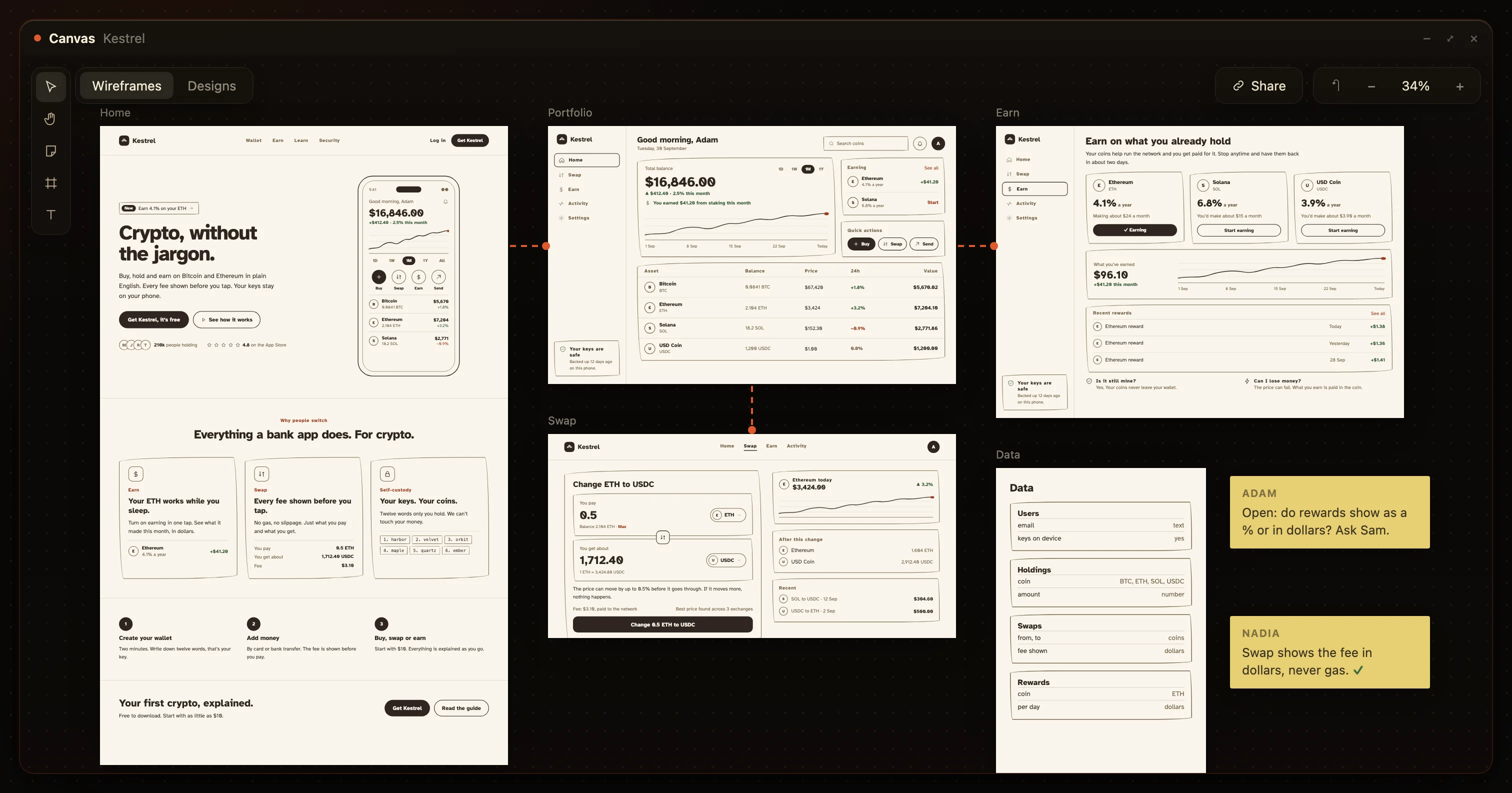
For Kestrel that is four screens, four tables and about a page of text. The same six steps, drawn rather than typed, look like this; a board cannot skip step 3 or 4, because a button with no words and a page with no states are visibly unfinished.
The first prompt
is one page.
Never prompt the whole product. An agent given twelve pages builds twelve vague ones and you correct all twelve. Given one page and everything the plan says about it, it builds that page properly, and you check it against the plan before the next.
The first prompt is page one of the list, with its words, its states, its data, and a line at the end that says stop. Here it is for Kestrel.
Build page 1 of the plan only: Swap. Nothing else yet.

What it is
A crypto wallet for people who find crypto confusing. This page is the one the product exists for.

On it
- You pay: the amount and the coin (ETH by default)
- You get about: the amount in the other coin
- The fee, in dollars
- A button that says "Change 0.5 ETH to USDC"

Rules
- The fee is shown in dollars, never in gas or gwei.
- Nothing is sent until the button is tapped.

States
- Not enough ETH: "You have 0.31 ETH. Change that instead?"
- The price moved more than 0.5%: "The price moved, so nothing happened. Your ETH is still here."

Data
- Reads: holdings (user_id, coin, amount), prices (coin, usd)
- Writes: one row to swaps (from, to, amount, fee_usd, status "pending")

Stop
When this page works with the states above, stop and show me. Do not start page 2.
The “Stop” line matters more than it looks. Without it the agent keeps going into pages you have not checked, and the corrections start compounding again.
Then page two,
against the plan.
Check each page against the plan before prompting the next. Open it as the user. The button says what the plan says. The fee is in dollars. Not enough ETH shows the sentence you wrote. If something is off, the correction is one line, because you can point at the line in the plan it broke.
Then page two, the same way: the page, its words, its states, its data, stop. The agent has page one in the codebase and the tables from the plan, so page two lands on ground that already holds. This is the whole difference from the loop in the first section: every prompt adds a page instead of rebuilding one, and the plan is the thing you check against rather than your memory of what you meant.
When the list is done, the product is done, and the plan is now its documentation. Keep it in the repo. The next agent reads it before the next change.
When you change your mind,
change the plan first.
You will change your mind halfway. Make the change on the list, then prompt it. The fastest way back into the correction loop is to tell the agent “actually, show the fee before the amount” while the plan still says otherwise. Now the code and the plan disagree, and every later prompt has to guess which one you meant.
Move the decision on the plan, read the pages it touches, then prompt those pages. It is one more minute and it keeps the plan true, which is what makes the next prompt cheap.
The plan is the product, and a plan you can only read is a worse plan than one you can move around.
HuntingHydra, the line the canvas was built on
Or spend the hour
moving boards instead.
Everything above is easier on a canvas than in a document, because the gaps are visible. A page with no button has no button. A state you did not draw is a board that is missing. Changing your mind is dragging a board, and the plan and the product stay the same thing.
On HuntingHydra, the six steps are what Nadia does with your one sentence: she draws every page as a board with the words on it, the states you did not ask for, and the data beside them. You move them until they are right, and Devi builds exactly those, one at a time, the way the first prompt above does. Your own Claude Code or Cursor can drive it over MCP; the setup is on /docs.
Questions.
What is vibe coding?
Describing what you want to an AI coding agent and accepting what comes back, then correcting it in conversation until it works. The correcting is where the time goes.
How long should I plan before vibe coding?
Long enough to list every page a user meets, put real words on each, and name what goes wrong. For a small tool that is an hour. Skipping it costs the afternoon.
What should the first prompt be?
One page, with everything the plan says about it. Never the whole product. The agent builds one page well and twelve pages vaguely.
Can the plan be drawn instead of written?
Yes, and it is better drawn: a board cannot leave the gaps a sentence can. On HuntingHydra, Nadia draws the boards from one sentence and Devi builds exactly those.
Type one sentence.
Get the plan back, drawn.
The six steps above, done for you, as boards you can move.