
A PRD for Lovable
goes in two places, and neither is the first message.
Lovable has Project knowledge for what is always true and Plan mode for what gets built next. Here is the PRD split the way Lovable reads it, with both halves for Kestrel.

· Seven minutes
The first message
scrolls away.
Most PRDs for Lovable are pasted into the first chat message, and by the tenth message they are gone. Lovable builds from what it can see, and what it can see in a long chat is the last few turns. The decision you made on line forty of the PRD is not one of them, so the fifteenth prompt gets a fresh guess.
Lovable has two places built for this. Project knowledge is persistent: its docs list “the application purpose, database schema, architecture decisions, or domain terminology” as what belongs there, up to 10,000 characters, remembered across every conversation. Plan mode is where the next change is thought through before code: it writes a structured plan to .lovable/plan.md, nothing changes until you approve it, and approving switches to Build.
So the PRD splits. What is always true goes in Project knowledge. What gets built next goes through Plan mode, one page at a time. The shape of the whole spec is in the first post; this one is where each half goes in Lovable.
Project knowledge:
what is always true.
Put here what every future prompt should already know. The one-sentence purpose. The words you use and the ones you refuse. The tables, with their columns. The decisions you have made, so no plan re-opens them. The questions still open, so no plan closes them for you.
Keep it under the 10,000-character limit by leaving the pages out. Pages change; this does not. For Kestrel it is under 1,500 characters and it looks like this.
## What this is
A crypto wallet for people who find crypto confusing. Buy, hold and earn, in plain English.
Every fee is shown before you tap. Your keys stay on your phone.

## Words we use
fee not gas · the price can move not slippage · earned not APY
Buttons say what happens: "Change 0.5 ETH to USDC", "Start earning". Never "Submit".

## Data
users        id · email · keys_on_device
holdings     user_id · coin · amount
swaps        user_id · from · to · amount · fee_usd · status (pending, done, stopped)
rewards      user_id · coin · per_day

## Decisions already made
- Fees in dollars, never in gas.
- If the price moves more than 0.5%, the swap stops and nothing is charged.
- Earnings as money first, % a year second.
- Keys stay on the device.

## Still open
- Do rewards show on Portfolio as a % or in dollars? Ask Sam before building Portfolio.
Workspace knowledge is the same idea across every project: coding standards, the libraries you prefer, naming. When the two conflict, Lovable’s docs say project knowledge wins, which is the right way round: Kestrel’s decisions beat the house style.
Plan mode:
one page, then approve.
Give Plan mode one page from the PRD and read what comes back before you approve it. The plan it writes is prose, and it costs a credit, so it is worth reading like a spec: does it name the not-enough-ETH state, does it show the fee in dollars, does it write a row with status “pending”. If a state is missing from the plan it will be missing from the build. Fix it in the plan, where the fix is a sentence, and then approve.
Plan page 1, Swap. Use Project knowledge for the data and the decisions.

On it: You pay (amount, coin) · You get about · the fee, in dollars ·
a button that says "Change 0.5 ETH to USDC".

States: ready · not enough ETH, which says "You have 0.31 ETH. Change that instead?" ·
the price moved, which says "The price moved, so nothing happened." · pending · done.

Reads holdings and prices. Writes one row to swaps with status "pending".

Write the plan for this page only. Do not plan Portfolio or Earn yet.
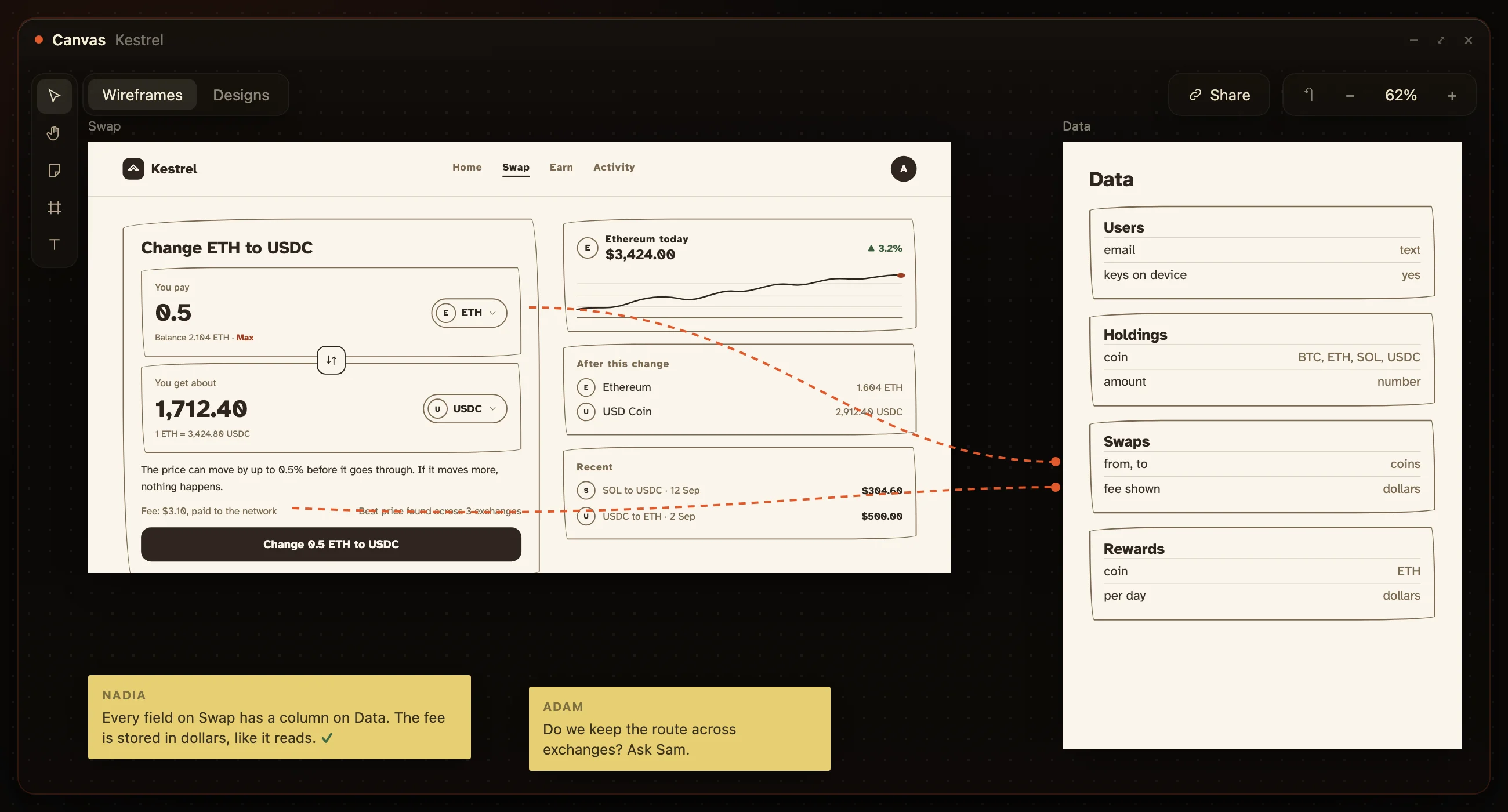
The last line matters. Plan mode will happily plan the whole product from one message, and the corrections then compound across pages you have not checked. The second post is the case for one page at a time; here is the page, drawn, so the plan has something to be checked against.
Build mode:
by component, with guardrails.
Lovable’s own guide says prompt by component, not page, and it is right about Lovable. The plan covers the page. The Build prompts that follow are the components on it, one at a time: the fee line, then the Change button, then the price-moved state. Each prompt has the three parts their docs name: what to build, where it goes, and what must stay untouched.
The third part is the one people skip. Their docs say it plainly: without boundaries a small request can ripple into parts of the app that already work. Name what stays untouched every time, and a change to the fee line stays a change to the fee line.
What to build
The fee line on Swap: the network fee in dollars, and under it "The price can move by up to
0.5% before it goes through. If it moves more, nothing happens."

Where it goes
Under the You get about field, above the Change button.

What must stay untouched
The You pay and You get about fields, the Change button, and the swaps table.
Real content,
on both sides.
Lovable’s guide says design with real content. The PRD is where the real content comes from.The button label, the price-moved sentence, the month-one email: written in Project knowledge once, they are in every plan and every build without being asked for again. A placeholder in the knowledge is a placeholder on the page.
This is also the part of the spec a copywriter or a client can read without knowing what Plan mode is. The words are in one place and they are the words that ship.
Or draw it,
and paste the boards.
Everything above is easier when the PRD is boards instead of paragraphs. A board cannot leave the gap a sentence can: the empty day is drawn or it is missing, the button has words or it does not, and the data board next to the page is the schema. Reading a Lovable plan against a board takes a glance; reading it against a paragraph takes a re-read.
On HuntingHydra, Nadia draws the boards from one sentence, with the words on them, the states you did not ask for, and the data beside them. Use them as the plan you check Lovable against, or let Devi build exactly those boards. Either way the spec exists somewhere it cannot scroll away. Setup is on /docs.
Questions.
Where should the PRD go in Lovable?
Split it. What is always true, the purpose, the tables, the decisions and the words, goes in Project knowledge. What gets built next goes through Plan mode, one page at a time, and you approve the plan before Build runs.
Does Plan mode cost credits?
Yes. One credit per Plan mode message, plus any research subagents it starts, per Lovable’s docs on 18 September 2026. Decide before you ask, and each plan is worth its credit.
Should I prompt a whole page or a component?
Lovable’s own guide says prompt by component, not page. Plan the page; then build it component by component, each prompt saying what to build, where it goes, and what must stay untouched.
Can the PRD be drawn instead?
Yes. On HuntingHydra, Nadia draws it as boards with the words and the data on them. Paste the boards into Lovable as the plan, or let Devi build them.
Type one sentence.
Get the boards, and the knowledge, back.
Both halves of the PRD above, drawn for your product, in the same hour.